The Capacity Planner for Hyper-V Replica guides the IT administrator to design the server, storage and network infrastructure which is required to successfully deploy Hyper-V Replica.
Learn from this Windows 8.1 Power User Guide about the advanced features of Windows 8.1, such as File Explorer, Task Manager, Internet Explorer 11, Mobility Center, Windows To Go, and SkyDrive Pro. With Windows 8.1, you can get the most out of your device efficiently.
VT Technology recently released a new version of vtUtilities (now in preview), adding Hyper-V Server 2012 R2 to the Microsoft Hyper-V Server versions it already supported.
Now you can cover all your virtual environment needs with all-in-one solution, managing all versions of free Hyper-V Server ( Hyper-V Server 2008 R2, Hyper-V Server 2012 and Hyper-V Server 2012 R2) from one application.
vtUtilities, designed for both accomplished and novice users, lets you to completely manage and maintain your Hyper-V by offering fully functioning monitoring capabilities, efficient network management, convenient diagnostic and troubleshooting features, management of virtual machines/virtual hard disks and networks on both local and remote Hyper-V Servers.
Besides managing capabilities for VM's created using past versions of Hyper-V, vtUtilities delivers every essential solution to manage free Hyper-V Server 2012 R2.
vtUtilities gains a host of new features, letting administrators to take advantage of Generation 2 Virtual Machines, get the most from virtual hard disk and storage quality of service, enjoy Hyper-V Replica (including support for extended replication) and Hyper-V virtual networking enhancements.
Manage Hyper-V Server 2012 R2 while still having a full access to Windows Server 2008 R2 and Windows Server 2012.
Not using Windows 8?
Solve the problem of managing Windows Server 2008 from Windows 7 by using vtUtilities - the tool provides a full graphical user interface and allows complete and effective management of virtual environments from the popular Windows 7 platform, as it does from Windows 8 as well.
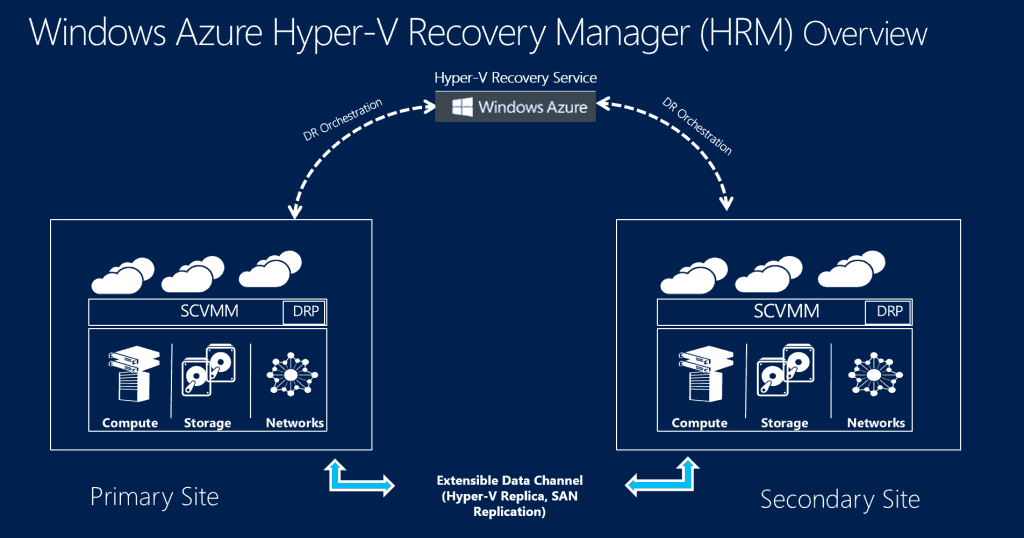
Microsoft announced GA of HRM today. Brad Anderson in his blog post states:
Windows Azure Hyper-V Recovery Manager Service protects your on-prem applications by orchestrating the protection and recovery of Hyper-V Virtual Machines running in a private cloud (i.e. System Center Virtual Machine Manager 2012 R2 or System Center Virtual Machine Manager 2012 SP1) to a secondary location.
Key Differentiators
Hyper-V Recovery Manager is unlike any other DR solutions previously available. A few key elements that really set it apart include:
Simple Setup and Configuration Hyper-V Recovery Manager has been designed for simplicity. Since it’s a hosted service, customers don’t need to install/deploy additional servers or worry about servicing/patching. By installing a lightweight VMM provider, they can extend their existing VMM environments and quickly make it DR ready. By leveraging VMM’s management capabilities, the service can also push cross-site configuration across a large number of Hyper-V hosts and Virtual Machines. This enables scale without comprising on simplicity. You also setup your DR policies at the cloud level. This allows you to express policy such as, “I want all VMs in the Finance cloud to be replicated to my local service provider,” or, “I want all VMs in the Redmond Cloud to be replicated to the Chicago Cloud.”
Automated Protection Hyper-V Recovery Manager leverages the capabilities of Hyper-V Replica to provide on-going replication of Virtual machines. The service also monitors for changes like VM migration, additions of new clusters, changes in network setting – and it automatically re-configures VM protection if needed. This ensures that Virtual Machines remain protected throughout the lifecycle without manual intervention.
Remote Monitoring Hyper-V Recovery Manager can be accessed via the Windows Azure Portal from any internet-enabled device. VM protection status can also be remotely monitored and, in the event of an unforeseen disaster, customers can begin the recovery operations remotely.
Orchestrated Recovery Cloud-based Recovery Plans enables automated DR orchestration by sequencing the failover of different groups of Virtual Machines. For example: In a multi-tiered application you can arrange the Database tier, middle tier, and web tier in different groups within a Recovery Plan and sequence it such that the database tier fails over and boots upbefore the other tiers. Additionally, recovery plans can be customized with scripts and manual actions. For example, one can combine a SQL Always On failover PowerShell script with a Hyper-V Recovery Manager Recovery Plan for application-specific DR operations.
Windows Azure Hyper-V Recovery Manager can be accessed by licensed Windows Azure admin using the Windows Azure Management Portal (https://manage.windowsazure.com/) under Data Services\Recovery Services.
Manage Hyper-V on Windows Server 2012 R2, Windows Server 2012, Windows Server 2008, Windows Server 2008 R2 from a single environment with vtUtilities. This release includes support for new functionality introduced in Hyper-V Server 2012 R2:
Generation 2 virtual machines.
Virtual hard disk and storage quality of service enhancements.
Hyper-V Replica enhancements including support for extended replication.
Hyper-V virtual networking enhancements
For a limited time we offer 30 day Preview version absolutely free, no registration required.
This build is pre-release version of vtUtilities that cannot be installed on top of previous version. Please backup your production setup and/or license files and uninstall vtUtilities before installing this preview.
In this course, you will learn about the new virtualization capabilities and innovations in Windows Server 2012 R2. The course starts off by delving into key capabilities of scalability and performance. Then, we'll explore security and multitenancy, in addition to business-critical needs, such as high availability, resiliency, and disaster recovery. The course finishes up with a look into the other innovative virtualization features in Windows Server 2012 R2.
View this two-module series for a complete understanding of the end-to-end process for implementing desktop virtualization using Windows Server 2012 R2 and Windows 8.1. Virtualization comes in many forms and can be fit to suit many enterprise needs, from creating virtual machines to run on Windows 8.1, to server-based scenarios for administering shared and personal virtual desktop environments using Windows 2012 R2 Hyper-V.
New courses released in November 2013
This course discusses what is new in the world of networking and how System Center 2012 R2 can help manage Windows Server 2012 R2. The course also provides insight into industry trends, performance levels, and network performance.
This course contains four modules that provide an overview of Server Manager and Automation, as well as detailing new management capabilities, updates to Windows PowerShell, deployment options and methods, and MultiServer Management capabilities. This course provides education that will assist in getting started with Windows Server 2012 R2 in regard to management and automation, helping you to create a more efficient work environment.
Windows Server 2012 R2 offers a great foundation for our customers to deliver private and hybrid cloud services to their constituents. This course looks into how Windows Server 2012 R2 helps businesses overcome the technical challenges involved in integrating solution elements while simultaneously meeting business and technical requirements. This course also describes how R2 features offer greater agility and efficiency benefits.
The world of bring-your-own devices (BYOD) provides businesses and users with flexible and low-cost productivity and connection solutions. At the same time, it presents IT Pros and admins with serious challenges in securing their infrastructure. In this course you will learn how Windows Server 2012 R2 helps you provision, manage and secure these devices while creating a seamless experience for the user.
New downloads become available from the Microsoft Download Center: MAP 9.0, Administrative Templates for Windows 8.1 and Windows Server 2012 R2, Windows Server 2012 R2 Test Lab Guide, Hyper-V Management Pack Extensions 2012 / 2012 R2, Windows Server 2012 R2 and Windows Server 2012 TechNet Library Documentation.
Microsoft Assessment and Planning Toolkit (MAP) 9.0
Microsoft is on track to deliver an update to Windows 8.1 and Windows Server 2012 R2 in 2014,
known as Windows 8.1 Update 1
The next wave of Windows updates, codenamed "Threshold" expected around Spring 2015, reported ZDNet's Mary Jo Foley.
Threshold will include updates to all three OS platforms: Xbox One, Windows (client and server), and Windows Phone, confirming Microsoft's plan for further integration between all of its platforms, in terms of sharing a common code base.
VB's reporter Devindra Hardawar wrote in his article
Xbox One may be the Microsoft's boldest attempt to unify all of its services, and after spending countless hours with the console since its launch, I’ve found it to be an even more telling view of Microsoft’s future. The Xbox One searches and browses the web just as well as any PC, and you can even multitask (on your television!) by “snapping” apps to the sides of the screen (a feature very familiar to Windows 8 users). With the Threshold wave of releases, we can expect the Xbox One to even act more like a PC.
Update: A year-off release codenamed "Threshold" will most likely be called Windows 9, according to Paul Thurrott:
Windows 8 is tanking harder than Microsoft is comfortable discussing in public, and the latest release, Windows 8.1, which is a substantial and free upgrade with major improvements over the original release, is in use on less than 25 million PCs at the moment. That's a disaster, and Threshold needs to strike a better balance between meeting the needs of over a billion traditional PC users while enticing users to adopt this new Windows on new types of personal computing devices. In short, it needs to be everything that Windows 8 is not.
To distance itself from the Windows 8 debacle, Microsoft is currently planning to drop the Windows 8 name and brand this next release as Windows 9.
In some ways, the most interesting thing about Threshold is how it recasts Windows 8 as the next Vista. It's an acknowledgment that what came before didn't work, and didn't resonate with customers. And though Microsoft will always be able to claim that Windows 9 wouldn't have been possible without the important foundational work they had done first with Windows 8—just as was the case with Windows 7 and Windows Vista—there's no way to sugarcoat this. Windows 8 has set back Microsoft, and Windows, by years, and possibly for good.
.png)


.png)

